Broken Affiliate Links: The 4 Types Killing Your Revenue (and How to Catch Them)
Your Traffic Can Stay Flat While Your Commissions Disappear
Broken affiliate links cost you commissions you already earned. Click into your plugin's admin panel right now — find a page that shows a real-time count of commercially dead links across your site (not just 404s, but out-of-stock pages, broken redirects, stripped tags).
For most affiliate tools, that view doesn't exist — they detect basic dead pages, but not the silent commercial failures.
You see the clicks in your analytics. The traffic is steady. But the affiliate commissions are down again, and you can't figure out why.
You tell yourself it's just a slow month. A seasonal dip. You bookmark the problem to investigate 'later' when you have more time.
That browser tab stays open for weeks.
The tool you pay for reports on clicks and shows you heatmaps. It gives you endless data, except for the one number that actually matters: how much money you are losing.
So you keep working on new content. All while your best old posts send traffic straight to a 404 page.
Even when a tool offers link monitoring, most checkers focus on basic 404 detection — which misses the commercial failures (out-of-stock, bad redirects, stripped affiliate tags) that quietly drain revenue.
RELATED INTEL: SCALE YOUR COMMISSIONS
How Much Revenue Is Leaking Right Now? (The Quick Answer)
I built DripBox because I was tired of finding broken affiliate links the same way you do — by accident, weeks after they cost me money.
DripBox runs routine background checks to help you catch commercially dead links before most of your readers ever notice.
$299, one-time, up to 5 sites.
The next broken link on your site shows up in a dashboard. Not in a reader's angry comment.
Find Broken Affiliate Links Before Your Readers Do
Catch silent revenue leaks before they cost commissions.
Why Affiliate Links Break After You Hit ‘Publish’
Standard link monitors only look for server crashes (basic 404 errors). But in affiliate marketing, a link can be perfectly functional from a technical standpoint while being completely dead from a commercial standpoint.
These are the core failures silently draining your revenue behind your back:
1. Dead Product Pages (The Obvious Wall)
This is the break everyone expects. You review a product, insert your link, and move on. Six months later, the merchant quietly deletes the item or undergoes a massive site redesign.
Your tracking link now leads directly to a broken error page. Your reader gets frustrated and bounces instantly.
The worst part? Your article still ranks high on Google. You did the hard work to win the traffic, but you are sending high-intent buyers straight into a brick wall.
2. Soft Out-of-Stock Redirects (The Silent Filter)
This is a brutal revenue killer. When an item runs out of stock, many large e-commerce platforms do not throw a 404 error. Instead, their system automatically redirects your link back to a broad category page or the storefront homepage.
Standard link checkers scan your site, see a successful "200 OK" response, and give you a green checkmark. They report the link is perfectly healthy.
But it’s commercially dead. Your reader wanted a specific product; now they are staring at a generic homepage. They won't search again—they just close the tab.
3. Broken Redirect Loops and Geo-Blocks
Sometimes the link destination changes completely behind the scenes. A merchant shifts affiliate networks, alters their gateway structure, or locks down their checkout page to specific geographic regions.
The user clicks, gets caught in a multi-step redirect loop, or lands on an "Access Denied" page because they are buying from another country.
The buyer's intent is instantly destroyed. The transaction is dead long before they ever have a chance to see the cart.
4. Tracking Parameters Break
This is the most invisible failure. The link works. The product page loads.
The item is in stock. Your reader even buys it. But you earn nothing.
Somewhere in the click-path, your unique affiliate ID was stripped from the URL. This can happen when a merchant updates their site, or their affiliate network changes how it processes links.
The sale happens, the commission is generated, but it never gets credited to your account.
You did all the work to earn that click, but a technical glitch made it worthless.
The damage is not always a dead page. Sometimes it is a living page that stopped paying.
A note on out-of-stock detection: Catching "Currently Unavailable" notices on a live page requires parsing the page content itself — not just the HTTP response. DripBox focuses on the response-level signals (404s, redirects, Access Denied), which catch the majority of commercially dead links. Out-of-stock pages on Amazon often produce redirect patterns (to category pages or the homepage) that DripBox does detect.
This isn't theoretical.
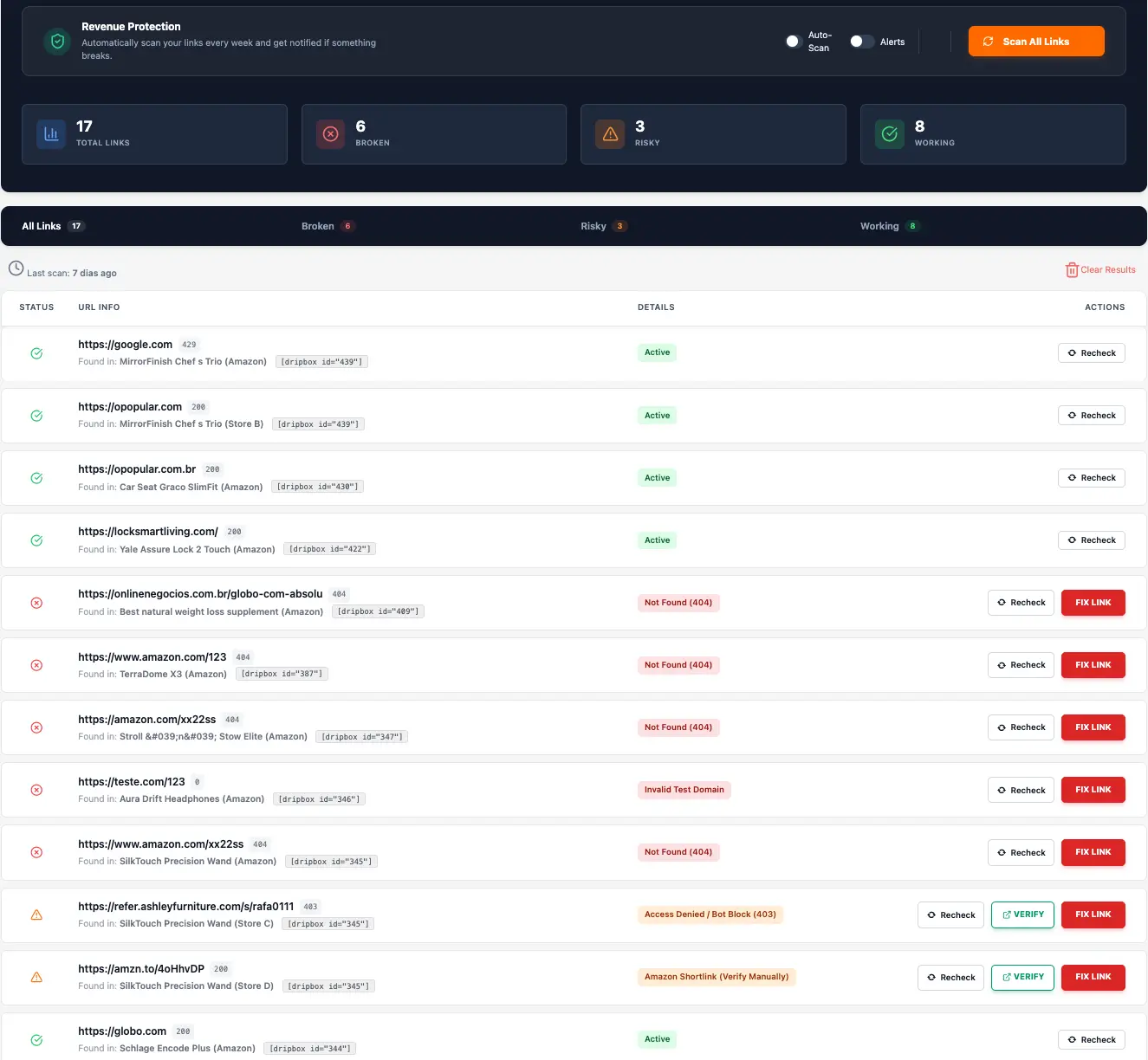
When you look at the DripBox dashboard, you don't just see a generic list of URLs. You see an active operational command center.
It segregates your links into clear, actionable buckets: Broken and Risky.
If a merchant link returns an HTTP 403, DripBox flags it instantly as "Access Denied / Bot Block".
If you have an old Amazon shortlink returning a deceptive 200 OK status, the system marks it as a risk and tells you to verify it manually before it drops your tracking cookie.
You don't guess. You don't scroll through thousands of lines of data.
You look at the dashboard, click "Fix Link" on the red flags, and secure your baseline revenue in less than five minutes.
Stop guessing which old posts are leaking commissions. Every day you wait, more product pages die quietly behind your old reviews.
DripBox is designed to spot them quickly during its automated scans.
Before you write this off as 'just my opinion,' read these:
The following are public user opinions found on third-party review platforms. This reflects one user’s experience, not a universal outcome. Buyers should review current product documentation, pricing, and support options before deciding. This site does not verify these claims and presents them for informational context only.
"Broken links sitting live means monitoring fell apart. Most affiliates focus on traffic and forget to audit the conversion path. By the time they notice, they have already lost months of revenue."
And another:
"Some affiliate networks do notify you, but relying solely on that isn’t wise. Once you reach hundreds of links, it’s definitely worth investing in some automation."
Manual Checking Works for 20 Links. It Fails at 200.
Imagine your top post generates 4,000 targeted clicks a month. One core product link has been silently redirecting visitors to a generic merchant homepage for months because the product variant changed.
Your reader hits an unorganized home directory, realizes they have to start their product search from scratch, and leaves your ecosystem immediately.
You probably have a spreadsheet tracking your articles. But the manual link audit you promised yourself last quarter simply isn't going to happen. The sheer scale is too overwhelming.
Instead, most publishers accept link rot as an unavoidable tax on their business—a natural decay of older work. It is easier to ignore it than face the massive chore of manually clicking hundreds of individual anchor links.
Every month, that leak expands. Your standard dashboards validate the incoming traffic volume, but they hide the operational health of the external destination.
Without an automated alert system, your fallback notification framework is a random reader leaving a comment saying: "Hey, this link doesn't work anymore." That is not a growth strategy.
"I have 300+ posts with links across multiple networks. Manually checking each one would take forever."
Built for Sites That Lose Sales to Dead Links
Monitors your affiliate links for dead pages, broken redirects, and suspicious response patterns.


The 5-Point Checklist for a Link Monitor That Actually Protects Revenue
💡 Doubling your search traffic to offset a broken-link leak is a six-month project. Repairing your existing broken links takes an afternoon.
Most affiliate tools advertise dozens of features. Three actually matter for protecting commissions:
- Detects bad redirects, not just simple 404s. A server response returning HTTP 200 isn't proof that the link destination still works for you.
- Monitors automatically, not just on publish. Your link can die six months after the audit. The tool has to keep checking.
- Surfaces broken links inside WordPress. Another dashboard means another tab you'll forget to open.
- Doesn't slow your site down. A monitoring tool that wrecks your Core Web Vitals costs you the traffic it's supposed to protect.
- Doesn't bill you monthly to do its job. Link rot is a permanent problem. Pricing should be too.
If your current tool fails on 2 or more of these criteria, it may be reporting clicks without protecting the revenue behind them.
How DripBox Turns Link Maintenance From a Chore Into a Dashboard
Here's what DripBox does that your current tool doesn't:
It scans every affiliate link on your site. It runs in the background. It follows a schedule you control.
It goes beyond basic 404s. It detects redirects to non-Amazon pages, redirects to Amazon's homepage (which often indicates a delisted product), Access Denied responses, and other anomalies that simple checkers miss.
When something breaks, you see it inside your WordPress admin. Not in a reader's angry comment. Not in a commission drop six weeks later.
The dashboard groups broken links by post. Your high-traffic articles get fixed first. No spreadsheet required. No weekend audits.
You publish new content. DripBox watches the old.
The next time a merchant kills a product page, you'll know on Tuesday. Not when it costs you the Friday sale.
"I have used it to test a few hundred links of mine and i was able to easily spot some broken links this way."
Most affiliate dashboards give you data — click counts, traffic graphs, conversion percentages.
What they often don't surface is the binary answer that matters most: is each link still earning, or is it commercially dead?
Is DripBox Right for Your Affiliate Site?
If you run a WordPress affiliate site with 50+ links, DripBox pays for itself the first time it catches a broken link on a high-traffic post.
For most sites, a single recovered commission pays back the license. The math is straightforward — if DripBox catches even one dead link on a high-traffic post, you've got your money back.
It's built for one person: the publisher who treats their site as a portfolio of assets, not a hobby blog.
Speed matters. Ownership matters. Recurring software bills don't.
DripBox does two things and refuses to do anything else:
It creates fast, clean product displays inside WordPress, and it tells you when those displays start pointing to dead pages.
No Shopify integration. No mobile app. No enterprise team features. If you need those, this isn't the tool.
If you don't — DripBox is built for exactly this moment.
DripBox Pros and Cons
Pull up your 10 highest-traffic affiliate posts. Click every link in every one. Count the dead ones.
That's a floor, not a ceiling — the rest of your site is worse.
There is no mobile app for checking reports on the go. We don't offer enterprise-level features like team accounts, single sign-on, or advanced analytics dashboards.
If you run a large agency that needs those tools, you'll be better served by another platform.
I built DripBox to do one job extremely well.
It is designed to find the commercially dead links that simpler checkers can miss. It alerts you to out-of-stock products, broken redirects, and missing affiliate tags.
You get an alert in your dashboard, not another weekly email report.
- No recurring renewal fee
- Built for affiliate sites that depend on link integrity
- One-time pricing fits a permanent maintenance problem
- WordPress-native — no external dashboard to learn
- Direct support from the founder
- WordPress only — no Shopify, Webflow, or Wix support
- No native mobile app for on-the-go editing
- Smaller template library than enterprise tools
You Should Buy if ...
You Should Skip if ...
Protect Old Posts That Still Get Traffic
Just $299. 30-day money-back guarantee.
You Already Know the Tool Isn't Working
You've published the content. You've earned the traffic.
Every dead link on your site is revenue you already worked for — and lost in the last 10 feet.
DripBox is $299. One time. Five sites. Lifetime.
If it catches one broken link on a post that already ranks, it has paid for itself.
30-day money-back guarantee.
The next year your renewal email doesn't show up is the year you stop losing commissions you already earned.
Frequently Asked Questions
What is a "commercially dead" affiliate link?
A commercially dead link is an affiliate link that no longer has the potential to earn a commission. This can be a simple 404 error, but it often includes links to out-of-stock products, pages with broken redirects, or URLs where your affiliate tracking ID has been stripped.
The link technically "works," but it can't convert into a sale.
Can my links be broken if my traffic numbers look fine?
Yes, absolutely. Your analytics tools can show you that people are clicking your links, but they can't tell you what happens on the other side.
A reader can click, land on an "out of stock" page, and leave, but your analytics will still report it as a successful click. This is why the problem is often invisible until commissions start to drop.
I check my links manually. Isn't that enough?
Manual checking is a great start, but it typically becomes unsustainable as your site grows. With hundreds of articles and thousands of affiliate links, the time required to click and verify every single one is enormous.
This manual process often gets postponed, leaving your site exposed to revenue loss for long periods.
How does DripBox find these broken links?
DripBox is designed to automate the link auditing process directly within your WordPress dashboard. It scans your site not just for dead pages (404s), but also for common commercial failures like out-of-stock notices and bad redirects.
In most cases, it provides a clear, actionable list of links that need your attention, saving you hours of manual work.
Who is DripBox for?
DripBox is built for WordPress-based content creators and niche site owners who want to protect and maximize their affiliate revenue. It is best suited for entrepreneurs who value efficiency and prefer a focused tool that solves a critical problem without unnecessary complexity.
If you manage one or more affiliate sites on WordPress, DripBox is designed for you.
